Tâm trạng hàng ngày | Hạnh phúc
2-7-2025 09:43 PM |
|---|
Đã viết: 13 ngày [LV.3]Spam 3
|
Mời bạn đăng ký để giao lưu kết bạn nhé <3
Bạn phải đăng nhập để xem được nội dung, nếu bạn chưa có tài khoản? hãy Đăng ký
x
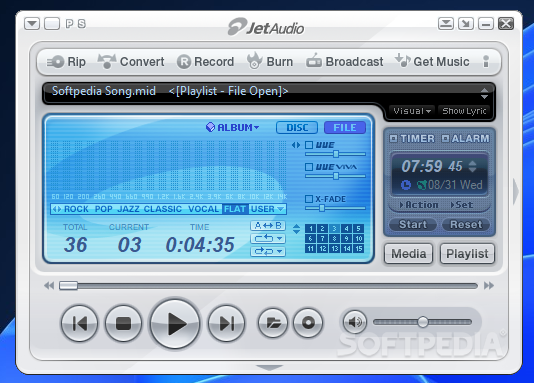
New in jetAudio 8.0:
* New video window display modes:
- Show always / Show only when playing / Attached
* Album art / Spectrum display in Video window when playing music
* Spectrum display in Lyric window
* New file association method for Windows Vista/7
* Supports subtitle with DXVA decoding
* Enhanced skins
* Supports FLV/MKV formats for video conversion
* Added General Presets for video conversion
* Shows in Playlist window
* Fixed many bugs/suggestions posted in our forum (thanks to the postings)
- Multi-sort in Playlist window
- Enhanced context menus of Playlist/Video window
- Added DVD Pal/NTSC for video conversion
- Supports Crossfade for mono
- Fixed video window resizing for EVR
- Fixed WAV playback (GSM codec)
- Fixed OSD (Music) opacity
- Transparent spectrum background in Media Center (set SpectrumColor_Back / SpectrumColor_Dot as -1)
- All Default skin sources included (only jsc files)
[Tip when using remote controller]
(for MCE remote controller)
• GUIDE button : Display Navigator window
• MUTE button : Delete a file in Navigator window
• MORE button : Sort files (Navigator) or change audio (DVD playback)
• BACK button : Refresh (Navigator)
• RECORDED TV button : Switch to File Mode
• DVD MENU button : Switch to Disc Mode (when stopped) or display DVD menu screen (while playing DVD)
• CH +/- button : Switch to next/previous album/playlist
• LIVE TV button : Change subtitle (DVD playback)
(for Streamzap remote controller)
• MENU button : Display Navigator window
• MUTE button : Delete a file in Navigator window
• RED button : Sort files (Navigator) or change audio (DVD playback)
• GREEN button : Refresh (Navigator) or change subtitle (DVD playback)
• YELLOW button : Switch to File Mode
• BLUE button : Play disc (when stopped) or display menu (DVD playback)
• CH +/- button : Switch to next/previous album/playlist
Homepage - http://www.jetaudio.com
|
|

 /1
/1 


 Thẻ IP
 Thẻ đánh hơi
 Đăng lúc 4-12-2010 04:21 PM
 Thẻ thăng tiến
 Thẻ đỉnh cao
 Thẻ trầm mặc
 Thẻ huyên náo
 变色卡
变色卡 Thẻ cướp Tem
 Đóng đinh
 显身卡
显身卡